


Look back · capture & explain

hindsight

Forensic post-trade analytics. Every fill is ingested with its quote context, so you can explain exactly how your liquidity, your clients and your book behaved.

What it does
  • Markouts on every fill, from −2m to +2h
  • Revenue and account attribution
  • Price history and best execution
hindsight · Markouts

Know exactly which flow is taking value off the desk

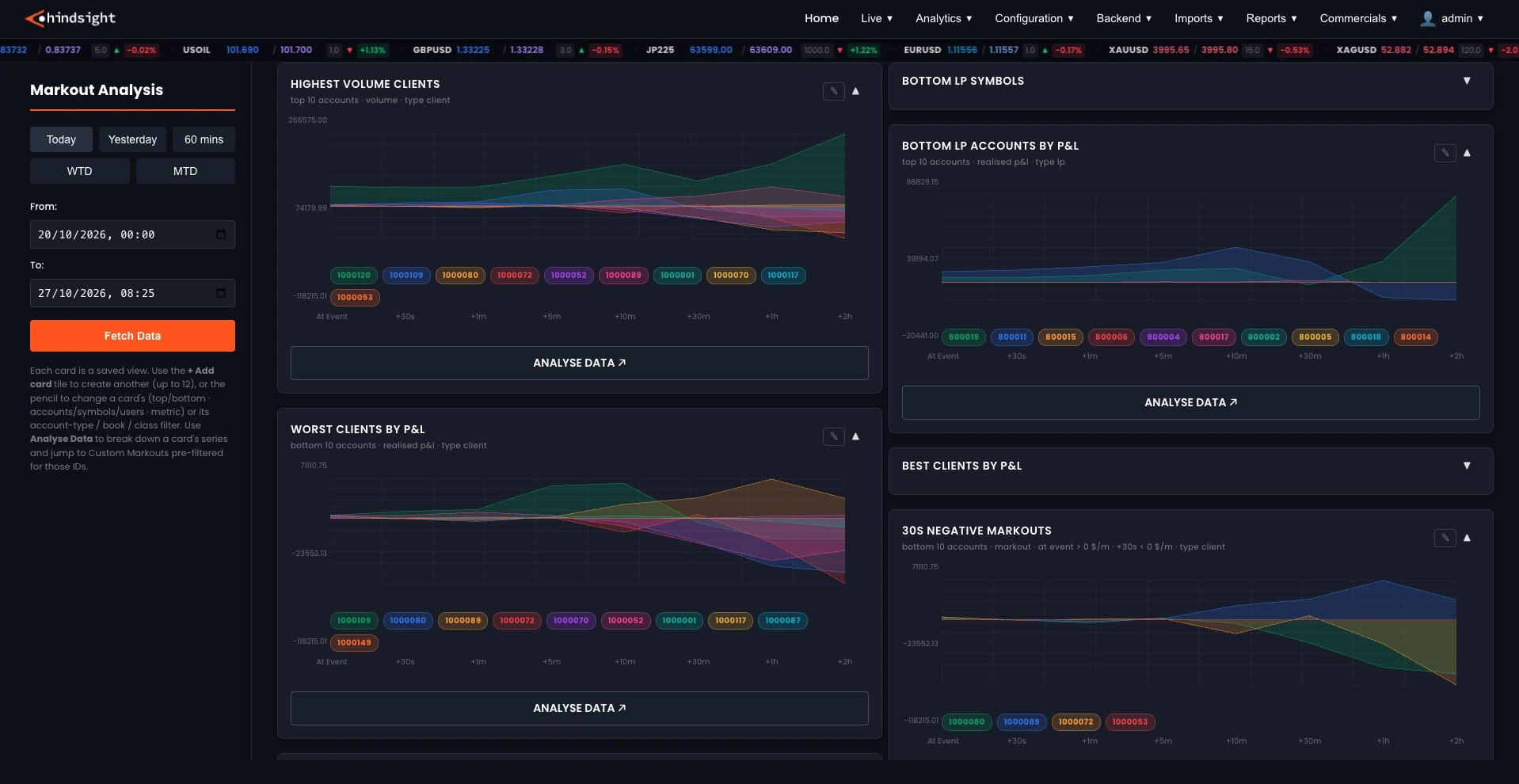
Configurable multi-horizon markouts on every client, LP and symbol, from two minutes before the fill to two hours after it. Save the groupings you visit time and again (biggest P&L winners, negative spread payers), then drill into the evidence you need to grade flow and renegotiate with liquidity providers.
Twenty horizons, −2m to +2hIncluding sub-second points at ±100ms and ±500ms, per trade or size-weighted.
Custom Markouts workbenchAny combination of account, symbol, order ID, side and date, with pre-markouts on demand.
The hindsight Markout Analysis screen: date presets and a date-range picker beside saved chart cards (highest volume clients, worst clients by P&L, bottom LP accounts by P&L, 30s negative markouts), each plotting ten accounts across markout horizons from the fill out to two hours after.
Inside hindsight

What the book made, and where it came from

Balance, equity, margin and cash movements are accounted for alongside every fill, so revenue, accounts and prices can be explained down to the individual trade.

Account Analysis

Everything about one account, or one client with all of their accounts together, live or historical. Equity, P&L, positions, trades, markouts and commercial charges in one place, with WTD, MTD and YTD quick filters.

  • Start / end equityThe basis for the equity-change P&L measure.
  • Realised / unrealisedP&L split by whether the position is closed or still open.
  • Spread $/MRevenue earned from the account, normalised per million.
  • % of total bookThe account's share of the whole book on the selected metric.
  • Markouts chartThe quickest read on whether this client's flow is toxic.
Analytics › Performance

Revenue Analysis

The total company revenue page and the source of truth for EOD P&L, taking equity directly from LP statements and client accounts. Breakdowns pivot by client, symbol, LP and day, with commercial terms applied where the module is enabled.

  • RevenueSpread, markup, commission and swaps, net of what is paid away.
  • Net spreadSpread captured from clients less spread paid to LPs.
  • $/M and $/lotNormalised, so clients, symbols and LPs compare regardless of size.
  • Net (LP − client)What the desk kept after the LP side is accounted for.
  • EOD-anchoredPeriods follow the 17:00 New York session, matching the accounting day.
Analytics › Performance

Price History

The stored quote history for a symbol, used to verify a price, investigate a dispute or check a feed. Ticks from connected price feeds can be stored for charting and spread statistics, so the evidence is there when a client query arrives.

  • Bid / ask / midThe quote at each stored timestamp.
  • SpreadThe spread at that timestamp, in pips.
  • SourceWhich pricing source the quote came from.
  • Use it forVerifying a fill, settling a price dispute, checking a feed.
Analytics › Execution Quality
One platform, three lenses

Part of a single loop

hindsight is where the loop starts. What it learns about your fills becomes the baseline insight reads the live book against, and the place every foresight action is measured.

Get started

See hindsight against your own flow.

Book a 30-minute walkthrough and we'll map it to your own venues, books and clients.

Request a demo →